Stage by Stage, Vendor by Vendor, Nothing Lost on the Way
Processing lays a batch out as the stages it really goes through: dyeing at one vendor, embroidery at a karigar, finishing in-house. Each stage knows what went in, what came back, what was rejected or wasted and why, and what the vendor is owed at the rate you agreed.
Processing is E-Khata Cloud's stage-first way to run production and job work: pick the finished product, lay out its stages, and move material through them one issue and one receipt at a time, in-house or at an outside vendor. Every movement becomes a numbered note with a gate pass for the road, At Vendors shows what is still out, and when a stage completes, the vendor's charge posts to their account at their own rate.
Updated October 2026
A stage rail that reads like the floor
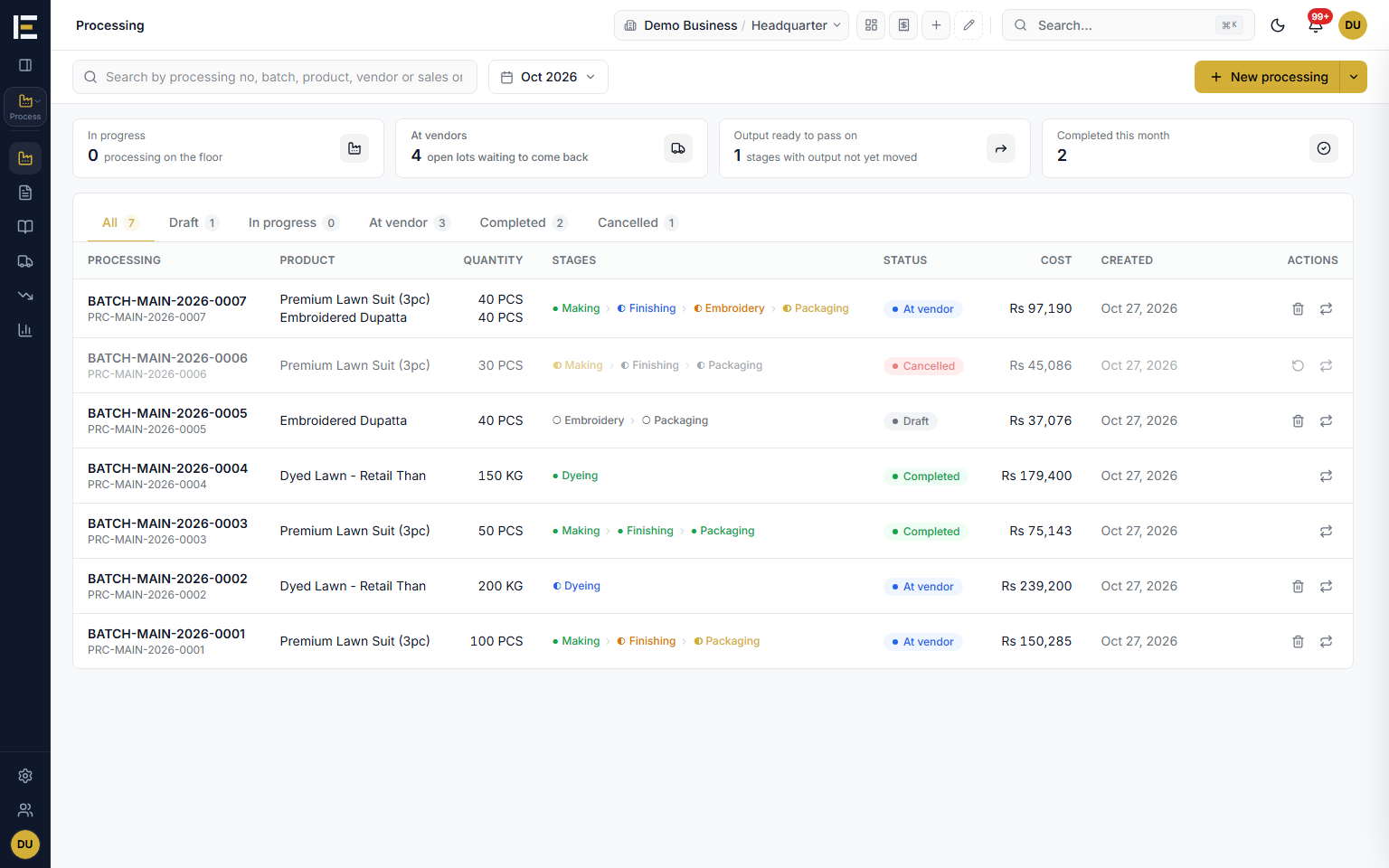
Pick the finished product and its recipe loads, scaled to the quantity you are making. The stages sit on a rail in order, each card showing who does it, In-house or Outsourced with the vendor's name, its status, how much has been received against what is expected, and the sends and receipts behind it. Insert a stage before or after, customise the fields a stage asks for, or fold the rail to numbered steps when the chain is long.
- Stage names you type once and pick again: dyeing, printing, embroidery, stitching, finishing, whatever your trade calls them.
- Statuses from Pending and Sent to vendor through Partially received and Received to Completed.
- More than one finished product in the same processing.
- Recipes (BOM) load on their own and are archived, never deleted.
- Cancel a batch and restore it later; nothing is deleted and the numbering keeps no holes.
Every vendor at their own rate
When a stage goes out, pick the vendor or karigar and how they charge: for pieces received, where rejected and wasted pieces are not paid; for quantity sent, like a dyer charging per kg sent; or for the planned quantity, whatever comes back. Put a rate on each output line and a fixed charge on top if they bill one. The stage shows what is owed as quantity times rate plus the fixed charge, and when the stage completes, that amount is credited to the vendor's account, where it ages and is paid like any supplier bill.
- Pay for: Pieces received, Quantity sent, or Planned quantity.
- Rate per unit on each output line, plus an optional fixed charge.
- Completing a stage posts the charge to the vendor's payable; reopening the stage reverses it.
- The vendor's account ledger is one click from the stage.
At Vendors: what is sitting where
At Vendors lists every lot that is out: the vendor, the batch, the stage, what was sent, what has come back, what is still there, the gate pass it left on, and how many days it has been away. A lot that is running late is flagged, so the call to the dyer is made before the order is late, not after.
- Sent, received and still there, per vendor and per stage.
- Age flagged when a lot runs past the stage's expected days.
- Gate pass chips open the pass the goods left on.
- Recent receipts listed beside it.
Receiving that understands yield, rejection and waste
Receive what came back in one dialog: expected, received so far, receive now, rejected and waste, with the wastage reason picked from your own list or typed once and kept for next time. When a stage turns one product into another, input is used in proportion to the output, so 960 in and 1,000 out is 0.96 each, and the next stage can only take what really exists. Tick one box and what you received passes straight on to the next stage.
- Rejected and Waste columns on every receipt, with a wastage reason.
- The Wastage page totals losses by reason and lists the stages that lost material.
- Undo an issue, a receipt or a pass-on; an edit keeps the same document number.
- Receive and complete a stage in one step once the full quantity is in.
Issue notes, receive notes and gate passes that print
Every movement is a numbered document created as it posts: an Issue Note when material goes out, a Receive Note when it comes back, a Transfer Note when one stage hands over to the next, and a Gate Pass for the road with the transporter, vehicle number, bilty number and driver. Each prints on A4, A5 or 80 mm from ready layouts, and the Documents register lists them all, searchable by number, batch, vehicle or bilty.
- A gate pass on every send to a vendor by default; on returns and in-house issues if you want one.
- After a send, E-Khata offers to print the issue note, the gate pass, or both.
- Costs stay off the notes unless you choose to show them, and never print on a gate pass.
- Documents register with tabs for issue notes, receive notes, transfer notes and gate passes.
The cost per unit, and the reports behind it
The tracking page says what is being made, where it is now, how much has been received with the yield, and the total cost per unit. The Costing tab adds up material, vendor charges and stage expenses such as freight and loading, then divides by what came out. Processing Reports carries a production register, output by product and vendor processing spend, and three batch registers sit with the other reports.
- Production register: planned, produced, yield, total cost and cost per unit.
- Stage expenses: freight, loading, commission, insurance, packaging and duty.
- Output by product and Vendor processing spend.
- Processing Issue Batch Report, Issue Batch Report (Raw Material) and Processing Receiving Batch Report.
One stage, several karigars, a note for each
A stage's work can be split between karigars, each with an issue note of their own that says what it is for: the product, the quantity and the rate. The stage's plan is the sum of its notes, so adding a karigar or lowering a note moves the plan with it. A note opens on its own page, its status says how much has come back, such as 50 of 100 back, and the arrow on its row receives only what is still out.
- Each issue and receive note names its karigar, and each karigar's charge goes to their own account.
- Issue more from the stage before whenever it is needed, always as a new note.
- After receiving, keep the pieces at the stage, move them to stock, or send them straight on, with the next stage's note opened and filled in.
- Receive notes show where their pieces went: still here, passed on, or in stock.
- Completing an in-house stage that made fewer than planned asks what happened to the rest: wasted or lost, or used up in the pieces that were made, which then carry its cost.
Cancel and restore, with nothing deleted
A cancelled issue, receive or pass-on note is kept exactly as it was: still listed as Cancelled, still printable, and restorable under the same number. When a note cannot be cancelled because later work used its goods, E-Khata names what has to be cancelled first, in order, instead of a bare refusal. Every change to a note is kept as well, so you can see what was changed and by whom, open the old version read only, or print it as it was.
- Cancelled notes stay in the list, printable and restorable under their own number.
- A blocked cancel names the notes to cancel first: the later stage's note that took the goods, then the receive notes.
- Each note's history shows every change, who made it, and the old version to open or print.
Correct a batch, and see the ripple before you save
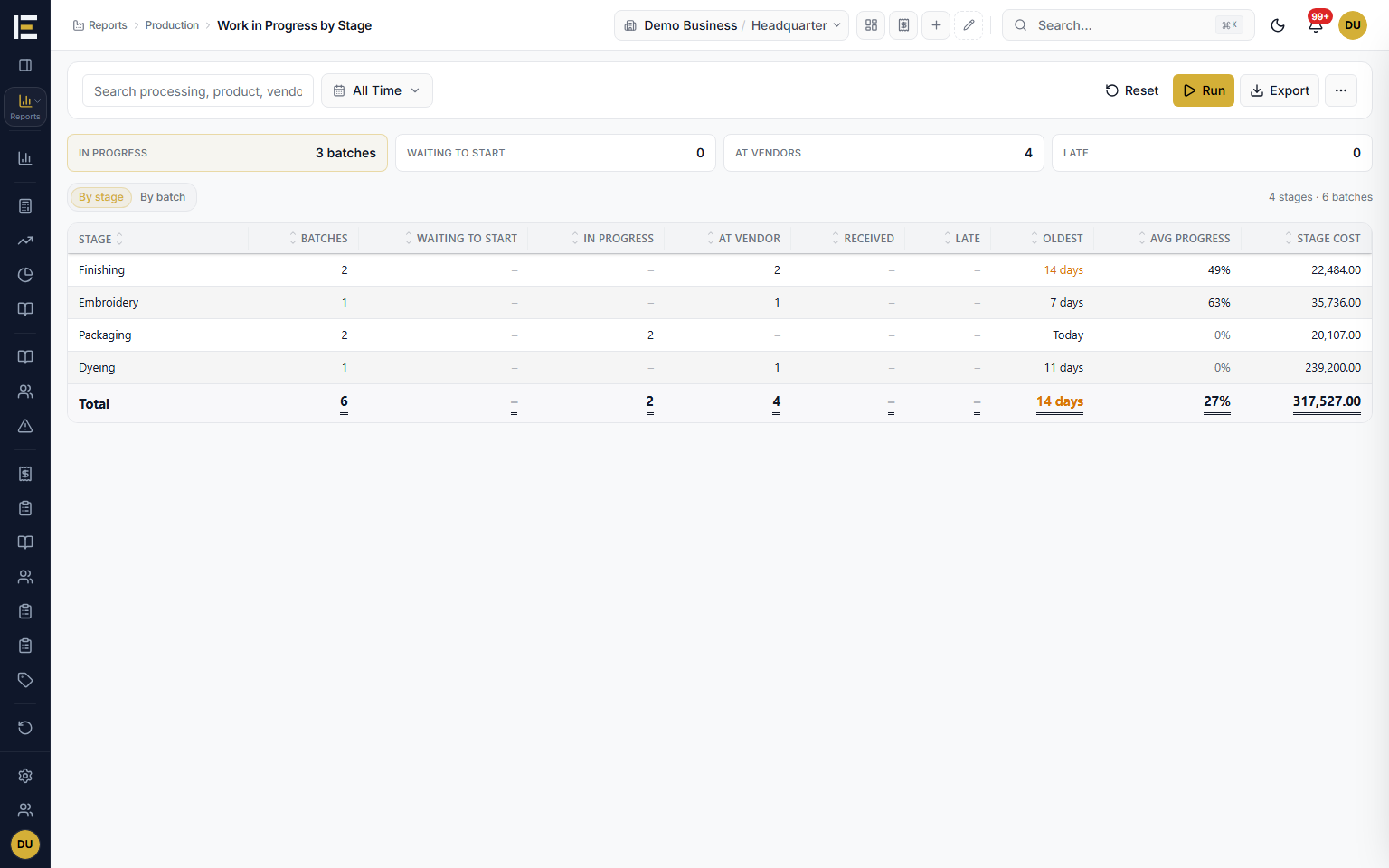
Mistakes surface late: a quantity typed wrong two stages back, a note that should have been smaller. Correct batch shows each stage before and after the change, with what is still pending, and when an edit to one note moves other documents, a ripple preview lists them before anything is saved. The save becomes one numbered change, Change #4 for example, listing every note it moved, so the history reads as decisions rather than a pile of edits.
- Change from here corrects the chain from the stage you pick.
- A note's pieces follow its new take, for example now for 160 instead of 200.
- Lowering a pass-on lowers the next in-house stage's issue in the same save, as long as nothing has been received there.
- A running batch can still gain a product; only the lines that have already moved are locked.
- The plan warns when a finished quantity cannot come from what the stage before will make.
Finished goods stay In production until the batch is done
A batch keeps what it receives In production until it is finished, so goods from an unfinished batch are not sold by mistake. For an urgent order, Move to stock now makes finished pieces sellable before the batch ends, at the same cost and with no extra accounting entry, and Undo move to stock takes back whatever is still on the shelf. Product pickers show a +N in production line, so the counter knows what is coming without counting it as stock.
- Finished pieces wait In production until the batch completes or you release them.
- Move to stock now for an urgent order: same cost, no extra entry, and it can be undone while the pieces are still in stock.
- Product pickers show what running batches will still make, as a plan, never as stock.
Recipes that learn from the floor
A recipe (BOM) holds the raw materials per piece and the stages a product goes through. Its page shows what the recipe is for, the finished products and the cost per unit. When a product has no recipe yet, the Issue and Send window offers to save the materials being issued as its recipe, and an issue note's materials can be saved back to the recipe per piece or loaded from it, so the next batch starts from what really happened.
- Save these materials as its recipe, offered in the Issue and Send window for a product with no recipe.
- Save to recipe and Load recipe on an issue note, per piece.
- Adding a product to a running batch loads its recipe, scaled to the quantity typed.
- Recipe costs can be hidden for a role, or for everyone in Settings > Appearance.
What production cost, and what each karigar is owed
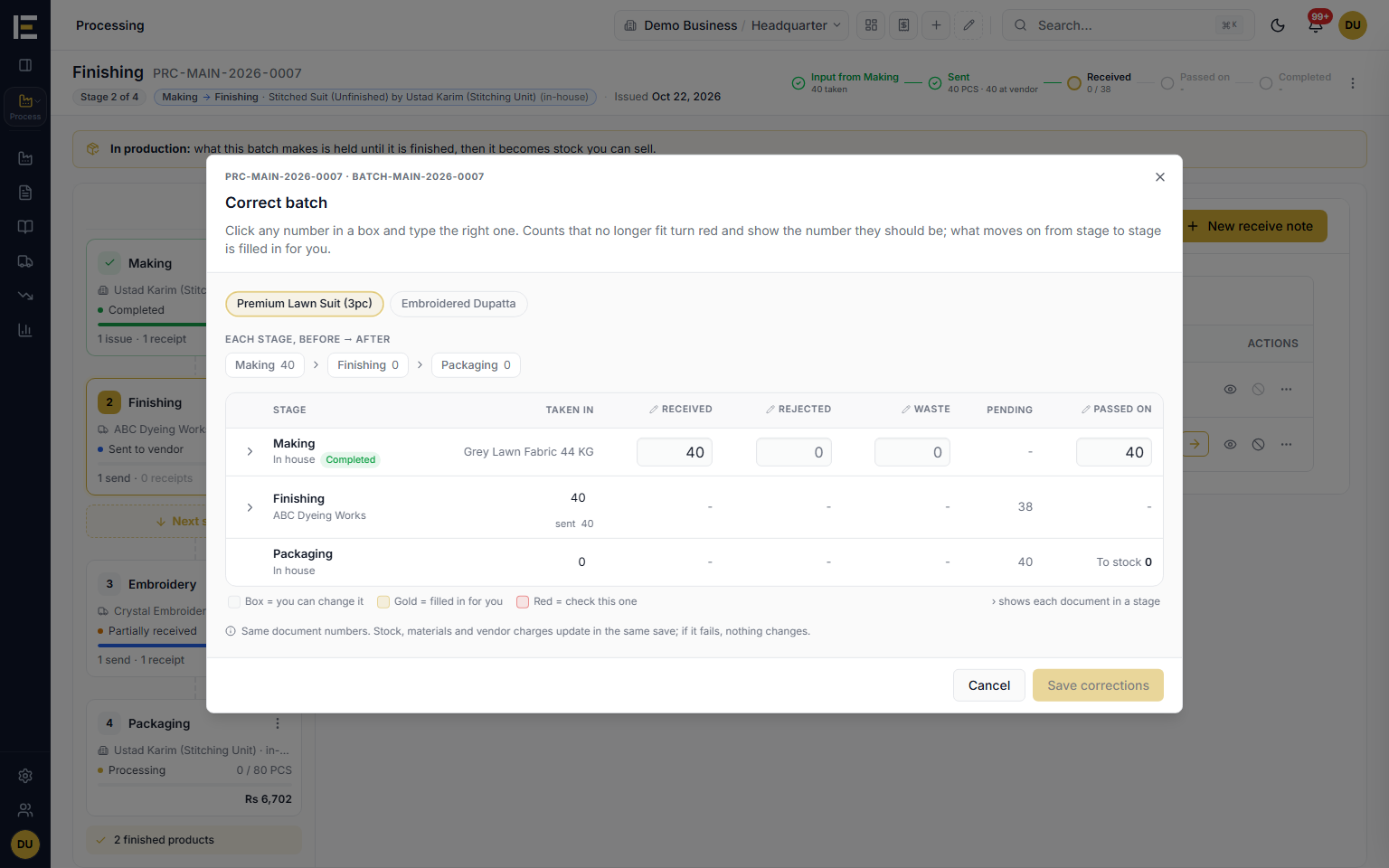
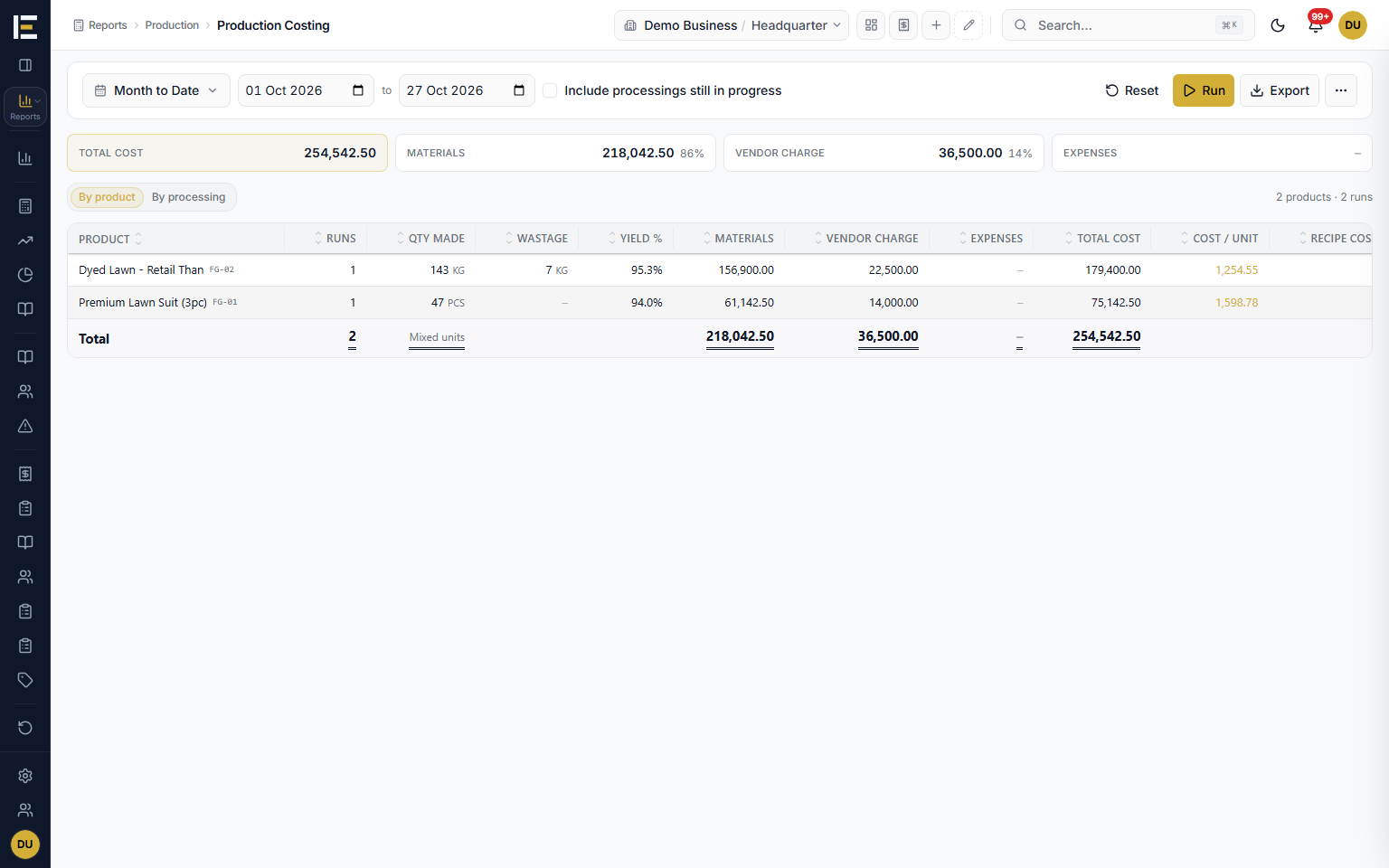
Three reports answer the questions owners ask most about production: what did it cost to make, what do I owe the karigar, and what are they still holding. Work in Progress by Stage was widened as well, so a running floor reads at a glance.
- Production Costing: materials, vendor charge and expenses for each finished product, by product or by processing.
- Processing Account Ledger: one karigar's or vendor's charges and payments with a running balance, each charge traced to its batch, stage, product, pieces and rate.
- Party Items Ledger: every issue to and receipt from each vendor or karigar, with what is still with them.
- Work in Progress by Stage: batches waiting, in progress and at vendors, what is late, what is still to come, and the stage cost.
How a processing batch flows
- Lay out the stagesPick the finished product and its recipe loads, scaled. Mark each stage In-house or Outsourced, choose the vendor, and set how and at what rate they are paid.
- Issue, send and receiveIssue material to the first stage, send it to the vendor with a gate pass, and receive what comes back with rejected, waste and the reason.
- Pass on, complete and payPass the output to the next stage, complete each stage as it finishes, and the vendor's charge posts to their account. The last stage's output goes to stock.
Who it is for
Frequently asked questions
Explore more of E-Khata
See how your business runs on E-Khata.
30-min Zoom or WhatsApp call. We'll walk you through E-Khata with examples that match your business type.

“We built E-Khata so business owners spend less time on the register and more time growing the business.”
Or message us on WhatsApp: +92 300 1676722 (we reply within 1 hour).