Accounting software that keeps its own books
E-Khata Cloud is double-entry accounting software for Pakistani SMEs that posts every sale, purchase, payment and receipt to the general ledger on its own, with no manual journals to write. You get a real chart of accounts, live party ledgers for udhar, cheque tracking, and a trial balance that always ties.
E-Khata accounting is a true double-entry system that sits under the whole product. Every document you create, a sales invoice, a purchase bill, a payment or a receipt, posts equal debits and credits to named GL accounts in the background. The general ledger is the single source of truth for account balances, party balances and aging, so it produces a trial balance, a profit and loss statement and a balance sheet from the same data.
Updated October 2026
Double-entry books from every document
You do not write journals by hand for normal trading. When a document is saved, E-Khata posts the matching debits and credits for you, and these auto-generated entries are submitted and locked so the audit trail stays clean. This is the core of books that close themselves: the data-entry person enters the document they already understand and the accounting happens underneath.
- Sales invoices post receivable, income and sales tax automatically.
- Purchase bills post payable and cost.
- Stock movements post cost of goods sold and inventory.
- Reversals are tracked separately from the original entry, never overwritten.
Chart of accounts you can actually read
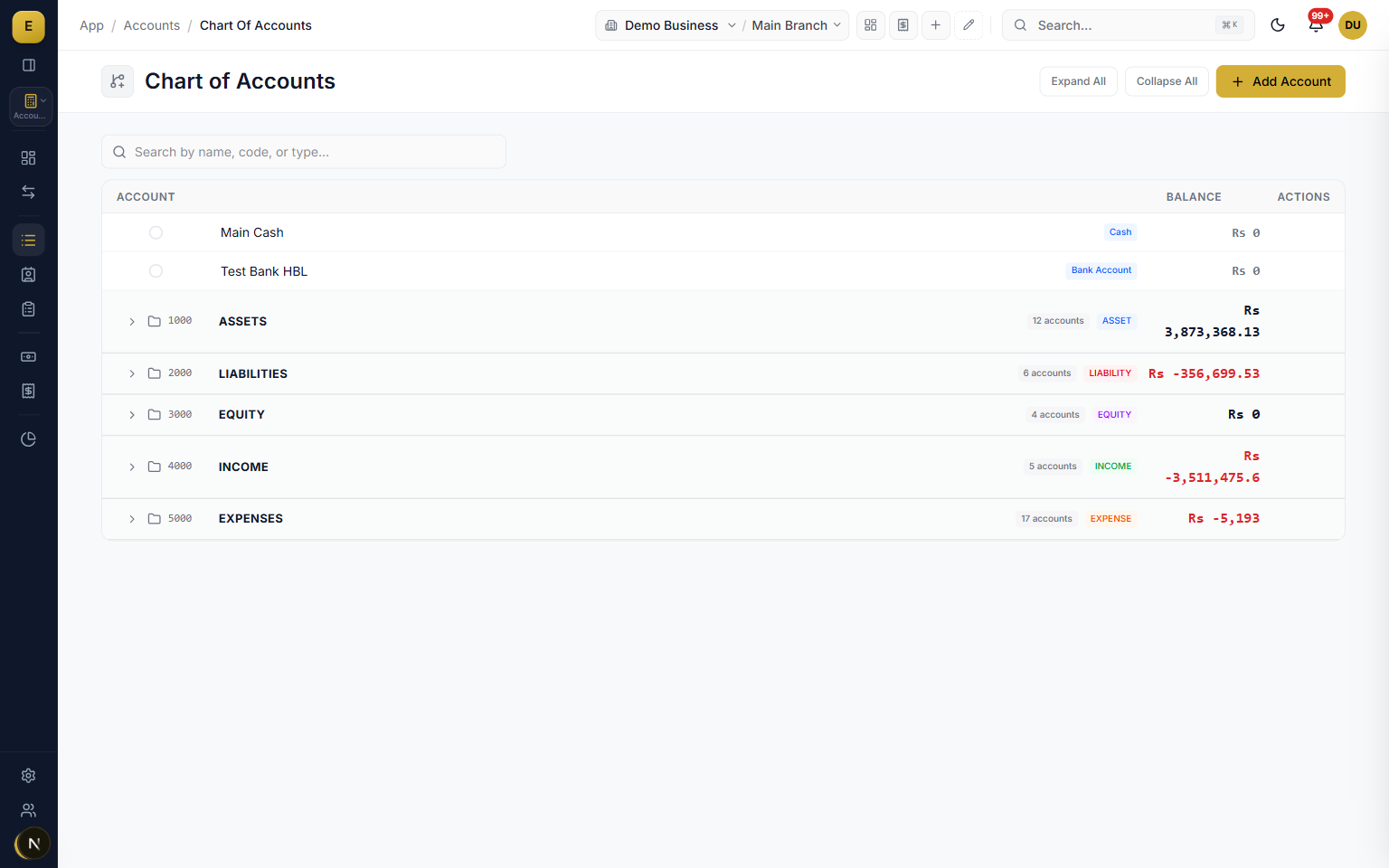
The chart of accounts is a tree grouped under five root types: assets, liabilities, equity, income and expenses. It ships with the account types a Pakistani business needs, including bank, cash, receivable, payable, stock, fixed asset, cost of goods sold, tax and depreciation. You can add accounts, mark a node as a group, set whether a balance must be debit or credit, freeze accounts you do not want touched, and add Urdu labels.
- Five root types: assets, liabilities, equity, income and expenses.
- Bank and cash sit in the same tree as dedicated account types.
- Run several bank and cash accounts and move money between them with an internal transfer.
- Freeze accounts and add Urdu labels on any node.
Payments, receipts and cheques
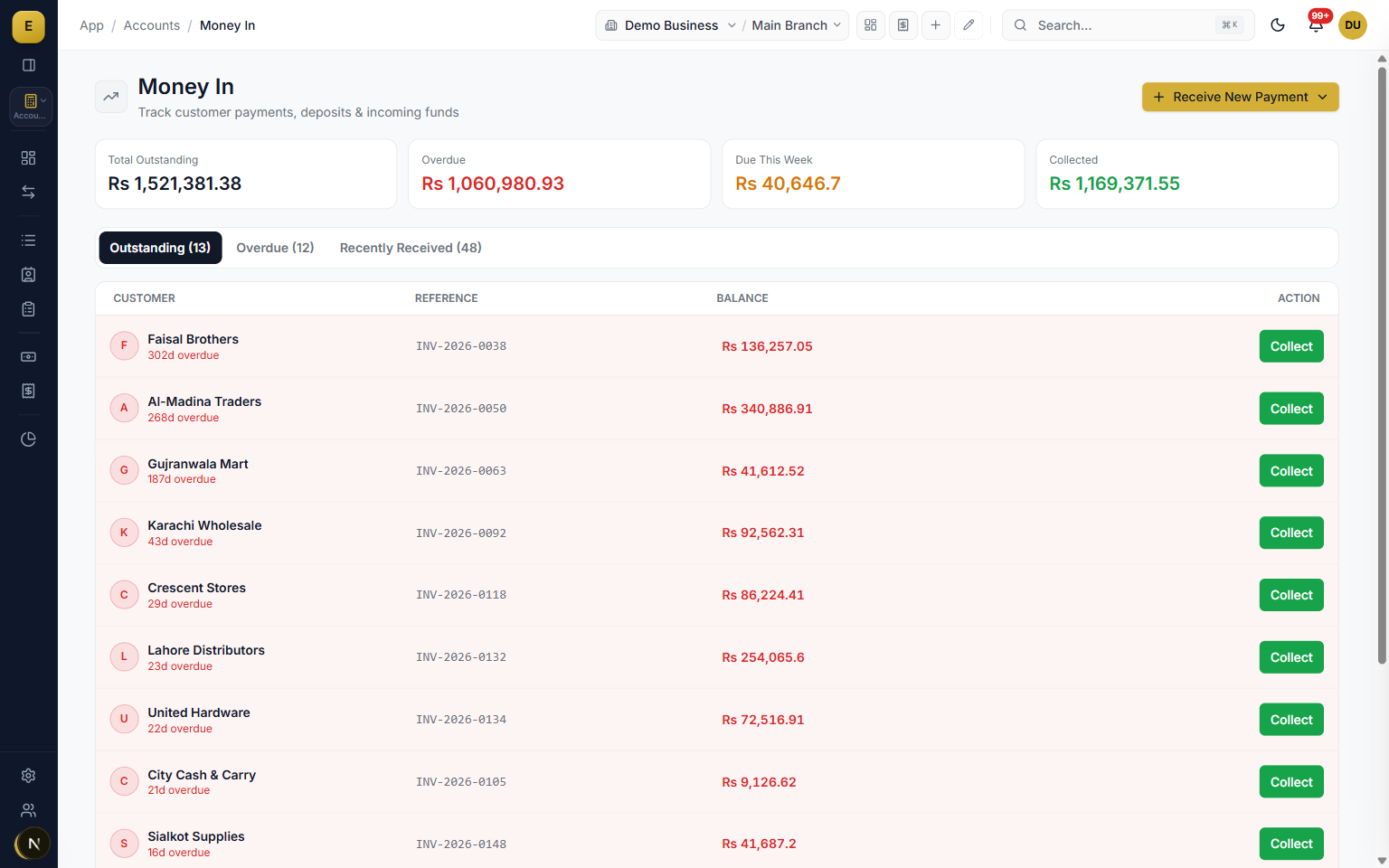
The payments and receipts flows cover every way money moves in a Pakistani business, and each one routes through a typed schema and posts its own GL entry. Cheques are tracked through their full lifecycle with eight statuses, from in hand and issued through deposited, cleared, bounced and cancelled. The accounting only hits your bank balance when the cheque clears, so post-dated cheques sit correctly until then.
- Receive payment, pay vendor, internal transfer, record expense, withdraw and bad debt.
- Allocate money to specific open invoices or let a FIFO waterfall settle the oldest first.
- Cheques carry number, bank, date and whether it is a cheque or a pay order.
- A bounce or reverse posts the matching GL reversal for you.
Party ledgers for udhar
Every customer and supplier has a running party ledger showing each invoice, payment and adjustment with a live outstanding balance. Credit sales increase what a customer owes you and credit purchases increase what you owe a supplier. You set opening balances and credit limits per party, filter by date, and read the outstanding amount as of any date.
- A running outstanding balance per customer and supplier.
- Opening balances and credit limits set per party.
- Aging buckets such as current, 1 to 30, 31 to 60 and 61 to 90 days past due.
- Receivable and payable aging so you know who to chase and which supplier to pay next.
A trial balance that always ties, with drill-down
The Trial Balance shows every account in the Tally style your accountant expects: opening, movement and closing per account, each in its own debit and credit column, over any date range, defaulting to your fiscal year. Accounts with opening balances appear even when they had no activity, totals confirm the books are balanced with a visible check, and every row drills straight into the general ledger for that account and period.
- Six money columns per account: Opening, Movement and Closing, each split into Debit and Credit.
- A green Balanced check when debits equal credits, or the exact difference in red.
- Cancelled and reversed entries are excluded, so the statement is never inflated by undo history.
- Export to CSV or PDF with the same filters you see on screen.
A profit and loss that shows your real margin
The P&L reads like a proper income statement, not a flat list. Revenue, less discounts given, gives net revenue. Cost of goods sold sits in its own section, so Gross Profit appears as its own figure: net revenue less cost of goods, the number a trader actually runs the business on. Operating expenses follow, other income is kept separate, and a compare mode overlays any prior period with variance.
- Gross Profit on its own line: cost of goods is never mixed in with tea and refreshments.
- Discounts given and discounts received each shown where they belong.
- Gains or losses on asset sales sit under Other Income, outside your trading margin.
- Every line drills to the ledger entries behind it.
A balance sheet that is always current
The Balance Sheet is computed live from the ledger for any as-of date, with no closing runs or snapshots to maintain. Accumulated profit splits into two honest lines: Retained Earnings for profit from before the current fiscal year, and Current Year Earnings for profit since, which ties exactly to a P&L run for the same period. The fiscal year defaults to July, matching Pakistan's tax year.
- Pick any as-of date, and compare against a second date with variance.
- Grouped the way accountants read: current assets, fixed assets, liabilities, equity.
- A balanced check on every run, to the rupee.
Close a period and it stays closed
When a month or a year is filed, set Books Closed Through to that date. From then on, nothing dated inside the closed period can be added, edited, cancelled, or restored, on any voucher type, by anyone. A filed year's statements stay exactly as filed. To correct something inside a closed period, an owner must first move or clear the date in Settings, which is itself a permissioned, visible act.
- Enforced at the same choke point every entry passes through, so nothing slips around it.
- The refusal names the lock date and tells the user exactly what to do next.
- There is deliberately no quiet per-user bypass.
Advances handled the way auditors want them
Money taken from a customer before delivery is not income yet, and money paid to a supplier before the bill is not an expense: E-Khata books both correctly. A customer advance against a sales order is held as a liability until invoicing, when it applies to the invoice automatically. A supplier advance against a purchase order is held as an asset until the bill lands. Refunds are first-class on both sides.
- Customer advances: received against an order, applied at invoice, refundable until applied.
- Supplier advances: paid against a purchase order, applied at bill, so payables aging stays clean.
- An order holding an unapplied advance cannot be quietly cancelled: refund first, then cancel.
- The receivable and payable ledgers stay untouched until a real document exists.
FBR, PRA and SRB ready
E-Khata is built for Pakistani tax. A Withholding Tax Payable account is pre-configured so WHT deducted from vendor payments has a home, and the product connects to FBR Digital Invoicing so sales tax invoices transmit in real time and carry an Invoice Reference Number and QR code. For services you set the right authority and rate per item, so goods go to FBR and services go to PRA in Punjab or SRB in Sindh.
- Withholding Tax Payable account pre-configured for vendor WHT.
- FBR Digital Invoicing with a real-time Invoice Reference Number and QR code.
- Goods to FBR, services to PRA in Punjab or SRB in Sindh.
- Opening balances stored as a balancing opening journal entry.
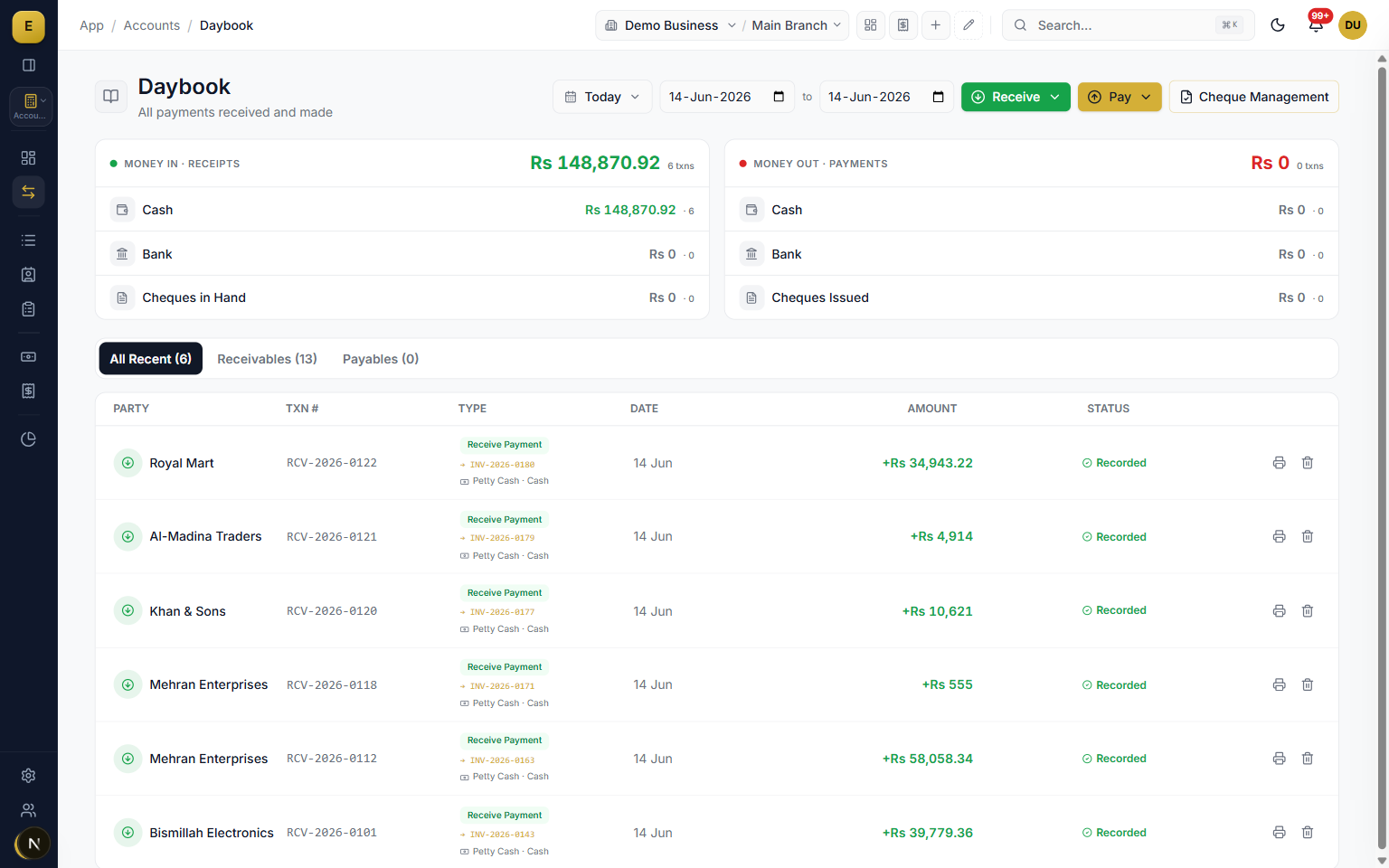
The screens an accountant lives in
The Daybook lists every entry of the day in order, with drill-down and a detailed variant. Journal Voucher, on the F7 key, records accruals, corrections and manual entries with the debit and credit checked before posting. Opening Balances is its own screen with the trial balance beside it, so the moment the books tie is visible. Bank Reconciliation matches statement lines to ledger entries by period, and the Cost & Profit and Committee screens have their own pages under Accounting.
- Daybook and Daybook (Detailed), with keyboard shortcuts.
- Journal Voucher on F7, balanced before it posts.
- Opening Balances with a live trial balance; Bank Reconciliation by period.
- Party groups, counterparty subledgers and the WHT Statement.
Discount Given and Discount Received, with no money moving
Some changes to a khata involve no cash at all: you knock Rs 500 off what a customer owes, or a supplier lets you off part of a bill. Discount Given and Discount Received are their own vouchers for exactly that. Each reduces the party's balance and books the amount to its discount account, and not one rupee enters or leaves a cash, bank or cheque account.
- Discount Given sits under Money Out and Discount Received under Money In, and both are in the New Transaction menu.
- Optional reason chips: trade discount, early payment, damaged goods, price adjustment, goodwill or bulk purchase.
- The Daybook lists them without counting them as money in or money out, so the day's cash stays true.
- The Discount Given and Discount Received reports list every one for any period.
Cash Short and Cash Over for the till
When the drawer is counted at closing and does not match the books, the difference needs a home that is neither sales nor cost of goods. Every business has two accounts ready for it: Cash Short, an expense recorded with Record Expense, and Cash Over, other income recorded with Record Income. A short drawer never touches your gross profit, and an over drawer never inflates your sales.
- Cash Short (5810) sits with operating expenses, not cost of goods sold.
- Cash Over (4990) sits under other income, below operating profit.
- Both are already in the chart of accounts, with Urdu names.
- Recorded from the two everyday forms, so nobody needs a journal voucher for a till difference.
Statements to read, and an Analysis view to take apart
The Profit and Loss, Balance Sheet and Trial Balance each open as a clean Statement, the way an accountant or a bank reads it, with an Analysis switch beside it. On the P&L statement, revenue builds up in plain steps: sales before returns, less sales returns, less discounts given, equals Net Sales, then cost of sales and Gross Profit. Analysis turns the same figures into a grid with a % of Net Sales column, a comparison period with its variance, and export. The Balance Sheet's Analysis grid adds % of Total Assets and a second date to compare against.
- Revenue build-up: Sales, Less: Sales returns, Less: Discounts given, Net Sales.
- P&L Analysis: % of Net Sales, and any prior period with its variance.
- Balance Sheet Analysis: % of Total Assets, and the variance against a second date.
- P&L and Trial Balance lines open the ledger behind them.
Multi-currency when you trade in dollars or dirhams
For importers and exporters, multi-currency is built in and stays off until you switch it on in Settings. Dollar bank accounts, parties who trade in a currency, ledgers with the currency and rupees side by side, and exchange revaluation are covered on the Multi-currency page. Your trial balance, P&L and balance sheet stay in rupees.
Credit and Debit Notes: change a bill without moving stock
When a posted invoice or supplier bill turns out higher or lower than it should be, Change bill amount makes a Credit Note, Debit Note or Supplementary Bill against it, and no stock moves. The khata and the bill's balance due update together. The Credit and Debit Notes page shows how it works.
Daybook entries keep working when the internet drops
With offline billing switched on, the Daybook forms keep working through an outage. Money in, money out, bank and cash transfers, party settlements and journal vouchers are recorded, numbered from the computer's reserved block and printed as usual. When the connection returns, the server posts each one to the ledger exactly as if it had been entered online. The chart of accounts, party balances, owners and loans stay open to read, and every figure the computer is not sure of carries the time of the last sync instead of passing for a live balance.
- Expenses, income, payments received, vendor payments, transfers, withdrawals and deposits.
- Owner money, loans, discounts given and received, bad debts and journal vouchers.
- Bank charges on a payment travel with it and post when it syncs.
- Never a zero for a balance the computer does not know: it says so instead.
Bank charges inside the payment, not a second entry
When the bank cuts a fee from a payment, type it in the Bank charges box under the amount on Pay Vendor, Record Expense or Transfer Money. The vendor is still paid the full amount, the bank goes down by the payment plus the fee, and the fee lands in Bank Charges, all in the one voucher, so editing, cancelling or restoring the payment moves the fee with it. The same box sits on an invoice payment received by bank transfer, where the customer is credited what they paid and the bank shows what actually arrived.
- The line spells it out, for example Rs 100,100 leaves HBL: Rs 100,000 paid + Rs 100 bank charges.
- Split payments carry a fee on each bank leg, and an issued cheque's fee is cut from the bank it is drawn on.
- The Daybook shows the payment with its fee underneath, and Money Out counts both.
- The printed voucher shows the payment only.
Inside Accounting
Who it is for
Frequently asked questions
Explore more of E-Khata
See how your business runs on E-Khata.
30-min Zoom or WhatsApp call. We'll walk you through E-Khata with examples that match your business type.

“We built E-Khata so business owners spend less time on the register and more time growing the business.”
Or message us on WhatsApp: +92 300 1676722 (we reply within 1 hour).